For most small Darwin shops, Shopify is the easiest and most reliable choice. WooCommerce gives more control if you're comfortable with WordPress, and a custom store only makes sense for unusual needs. Here is how to decide, with the trade-offs in plain English and a few Top End specifics on shipping and GST.
What's the difference between the three?
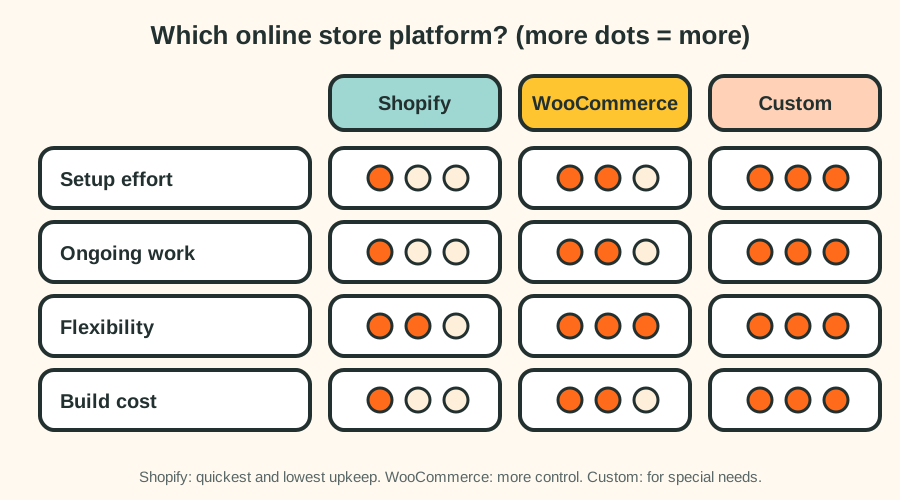
| Shopify | WooCommerce | Custom build | |
|---|---|---|---|
| How it works | A hosted platform. You pay a monthly plan. | A plugin on a WordPress website. You host it. | Built from code for your needs. |
| Setup effort | Low | Medium | High |
| Ongoing work | Low, platform handles security and hosting | Medium, you need updates, backups and security | Depends on the build |
| Flexibility | Good, with apps | Very high | Unlimited |
| Typical build cost | Lowest | Low to medium | Highest |
| Best for | Most small shops | Shops needing control, or already on WordPress | Special requirements |
When to choose Shopify
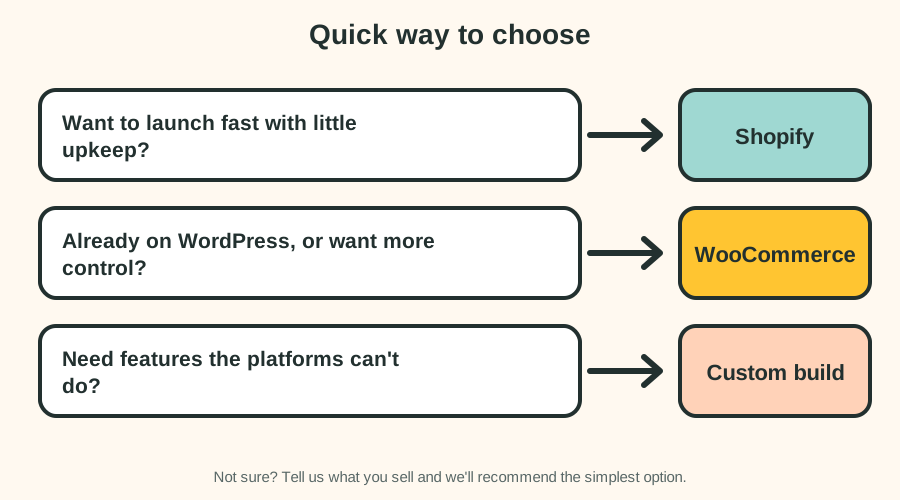
- You want to launch quickly.
- You'd rather not manage hosting, updates and security.
- You sell physical products and want built-in checkout, stock and shipping tools.
- You want a store that's easy for staff to run.
The trade-offs: you pay a monthly platform subscription and payment fees, and some features need paid apps. Always check the current plan prices on Shopify's own site.
When to choose WooCommerce
- You already have a WordPress website and want to add a shop.
- You want more control over design, data and costs.
- You're happy to keep the site updated, or to pay for a care plan.
The trade-offs: you manage hosting and security, and plugins need regular updates. It can cost less to run, but more to look after.
When to choose a custom store
A custom store makes sense when you need features the platforms don't offer, such as unusual pricing, complex bookings combined with products, or deep links to your internal systems. It costs the most to build and maintain, so don't choose it unless a platform genuinely can't do the job. If you're unsure, read custom software or a website: how to decide.
A quick way to choose
What does an online store really cost?
Cost has two parts: the build and the running costs.
- Build: our Online Store package is from $1,790 one-off, excluding GST, for up to 25 products with payments and shipping set up. See e-commerce in Darwin.
- Running costs: the platform subscription (for Shopify), hosting (for WooCommerce), payment processing fees, your domain, and any paid apps or plugins. We list these in your quote so you can budget.
A budgeting checklist
- Platform subscription or hosting, per month.
- Payment processing fees, usually a percentage of each sale.
- Domain, once a year.
- Paid apps or plugins you actually need.
- Photography and product descriptions.
- Care and updates, if you want someone to handle them.
- Packaging and postage supplies.
Selling from Darwin: shipping and GST
Two things matter more for Territory sellers than most people expect.
Shipping
Distance affects freight cost and delivery times. To keep customers happy and margins healthy:
- Show delivery estimates early, before the final checkout step.
- Use clear shipping rules. Flat-rate, weight-based or free shipping above a minimum order all work. Pick one that protects your margin.
- Offer local pick-up in Darwin if it makes sense. It saves you postage and wins local customers.
- Be honest about delays during the Wet season or after severe weather.
- Keep packaging light where you can, because freight is often charged by weight and size.
GST and pricing
If you're registered for GST, prices shown to customers should include it. Your platform can handle this, but it must be set up correctly, and receipts and invoices should show GST where required.
Payments: what do customers expect?
Most customers expect card payments, and many also want PayPal or digital wallets. Buy-now-pay-later options are popular with some customers. Each option has fees, so choose the ones that suit your customers and margins.
Making product pages sell and rank
- Use clear, original product descriptions.
- Add several good photos for each product.
- Show price, availability and delivery information.
- Include reviews if you have real ones.
- Use a short, descriptive title and address for each product.
Moving from another platform
If you already sell on another platform or marketplace, products and customer lists can usually be exported and imported. Designs have to be rebuilt, and some data such as order history may need extra work. Plan a launch date when it's quiet, and test the checkout thoroughly before you go live.
Mistakes to avoid
- Choosing a custom build when a platform would do.
- Forgetting running costs such as payment fees and apps.
- Not testing checkout, shipping rules and confirmation emails.
- Leaving out delivery and returns information.
- Launching with poor photos and thin product descriptions.
Frequently asked questions
Is Shopify better than WooCommerce?
Neither is better for everyone. Shopify is easier and lower-maintenance. WooCommerce gives more control but needs more looking after.
How long does it take to build an online store?
A small store with a few dozen products usually takes about 3 to 5 weeks once we have your product details and photos.
Can I move my store to another platform later?
Usually yes, though it takes work. Products and customers can normally be exported and imported, but designs have to be rebuilt.
Do I need an online store, or can I just take enquiries?
If you sell a small number of services or custom items, an enquiry form may be enough. If you sell products people can buy straight away, a store will convert better.
How much does it cost to build an online store?
Our Online Store package starts from $1,790 one-off, excluding GST, for up to 25 products. Larger stores are quoted after a free chat.
Next step
Tell us what you sell and we'll recommend the simplest platform for you. Get a free quote.