Your Google Business Profile is the free listing that appears in Google Search and Maps when someone looks for a business like yours in Darwin. For many local searches, it matters as much as your website. This guide shows you how to set it up properly, how to make it stand out, and what to do every month to keep it working for you.
What is a Google Business Profile?
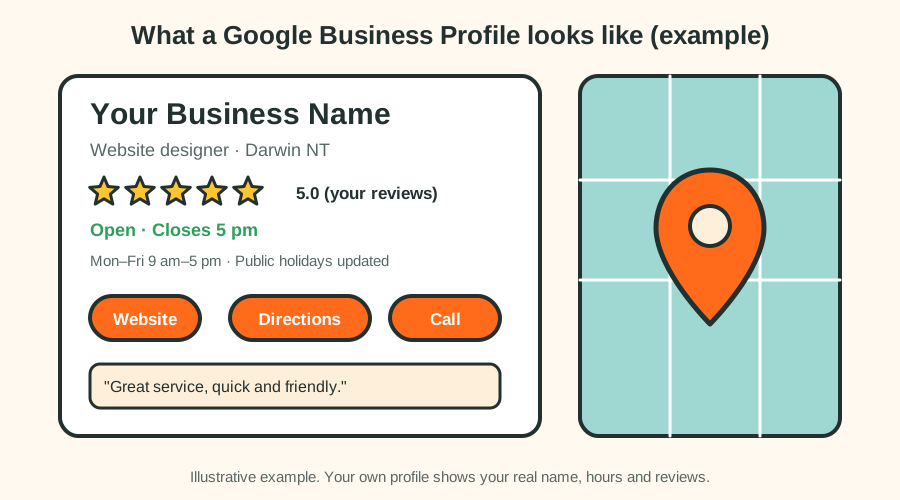
It is a free listing showing your business name, category, opening hours, phone number, website, photos and reviews. When someone searches "plumber Darwin" or "cafe Parap", the businesses shown in the map section come from Google Business Profiles.
How do I set up a Google Business Profile?
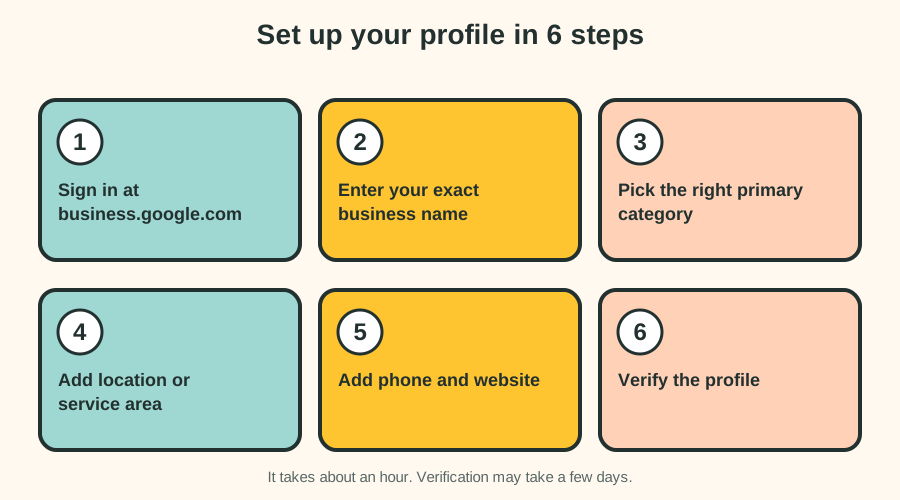
- Sign in and start. Go to business.google.com with a Google account you control, and search for your business. Create it if it doesn't exist.
- Enter your exact business name. Use your real trading name. Don't add keywords or suburbs, which breaks Google's rules and can get you suspended.
- Choose the right primary category. This is one of the strongest signals for what you appear for. Choose the most specific option, such as "Plumber" or "Website designer", then add secondary categories that truly apply.
- Add your location or service area. If customers visit you, add your address. If you travel to customers, set a service area, such as Darwin, Palmerston and Litchfield, and hide your address if you work from home.
- Add your phone number and website. Use the same phone number and website as everywhere else online.
- Verify the profile. Google will ask you to verify by video, phone, email or postcard. A profile that isn't verified won't be fully visible.
Which categories should I choose?
Your primary category should describe what you mostly are, not everything you do. Secondary categories cover the rest. Examples:
| Business | Possible primary category | Possible secondary categories |
|---|---|---|
| Cafe | Cafe | Coffee shop, Breakfast restaurant |
| Electrician | Electrician | Electrical installation service |
| Dental practice | Dentist | Emergency dental service |
| Web studio | Website designer | Web developer, Software company |
| Boutique | Clothing store | Gift shop |
Google's category list changes, so pick from the options it shows you rather than guessing.
How do I make my profile stand out?
- Complete every field. Opening hours, services, products, description and attributes.
- Write a clear description. Say what you do, who you help, and where. Keep it natural and accurate.
- Add real photos. Your premises, team, work and products. Add new ones regularly.
- List your services. Add each main service with a short description.
- Post updates. Offers, news and seasonal notes keep the profile active.
- Answer questions that customers ask on your profile.
A photo checklist
- Your logo and a clear cover photo.
- The outside of your premises, so people can find you.
- The inside, including the counter, seating or workspace.
- Your team at work (with their permission).
- Your products, dishes or finished jobs.
Use clear, well-lit photos. Avoid heavy filters and text overlays.
Opening hours and holidays in the Top End
Hours that are wrong are one of the most common reasons customers get annoyed. In Darwin:
- Set special hours for public holidays, including Picnic Day (the NT public holiday in August) and Christmas and New Year closures.
- If you change your hours in the Wet season or Dry season, update the profile at the same time as your website.
- If you close for a cyclone or severe weather, you can mark the business as temporarily closed.
What should I post, and when?
Posts are short updates shown on your profile. Ideas for Darwin businesses:
- Dry season: outdoor events, extended hours, tourism offers.
- Wet season: specials, delivery options, indoor activities.
- Public holidays: opening hours and closures.
- Anytime: new products, completed projects, team news, tips.
Aim for a post every couple of weeks, and keep each one short, useful and honest.
How do I get Google reviews?
Reviews are a major factor in how businesses rank in the map section, and customers read them before they call. Here's how to ask the right way:
- Ask happy customers straight after you've helped them, while it's fresh.
- Send a direct link. In your profile, use the option to get your review link, and share it by text or email.
- Make it easy. Keep your message short and friendly.
- Reply to every review, good or bad, politely and briefly.
- Never offer rewards for reviews, never write fake reviews, and don't ask friends who haven't used your service. Google can remove reviews and penalise profiles.
How to reply to reviews
To a positive review: "Thanks [name], we're glad we could help. See you again soon."
To a negative review: "Thanks for telling us, [name]. We're sorry this wasn't what you expected. Please contact us at [phone or email] so we can put it right."
Stay calm, don't argue in public, and move the conversation offline.
Keep your details consistent
Your business name, address, phone number and website should be identical on your Google profile, your website, social media and directories such as Localsearch and Yellow Pages. Inconsistent details confuse both customers and search engines.
Connect your website and your profile
- Link your profile to your website's home page, or to your most relevant service page.
- Show the same name, phone number and opening hours on your website.
- Add a map or address to your contact page if you have a physical location.
- If you need a site that supports local search, see our web design service in Darwin.
How do I know if it's working?
Your profile shows how many people found you, how they found you, and what they did: called, asked for directions or visited your website. Check these figures monthly. If calls and website visits grow, your profile is working. If they don't, review your categories, photos, reviews and hours.
Common mistakes to avoid
- Putting keywords or suburbs in your business name.
- Choosing too many or irrelevant categories.
- Using a virtual office or an address where you don't operate.
- Leaving old opening hours after the seasons change.
- Ignoring reviews and questions.
- Letting the profile go quiet for months.
Frequently asked questions
Is a Google Business Profile free?
Yes. Creating and managing a profile is free.
How long does verification take?
It can be immediate with a video or phone check, or take a few days if you verify by postcard.
Can I have a profile if I work from home in Darwin?
Yes. You can hide your home address and show a service area instead.
Do I need a website if I have a Google Business Profile?
Yes. A profile helps people find you, but your website is where you explain your services, build trust and take enquiries. They work best together.
How many reviews do I need?
There is no magic number. Aim to collect reviews steadily from real customers, and always reply to them.
Next step
Need a website that matches your profile and helps you win local customers? Get a free quote, or read what a website costs in Darwin.