If you need to tell people who you are and let them contact you, you need a website. If you need to do work inside your business more easily, such as take bookings, track jobs or manage customers, you probably need custom software or a web app. Many businesses need both, and they can start with the website.
This guide explains the difference, shows how to tell which you need, and explains how to start without overspending.
What's the difference between a website and a web app?
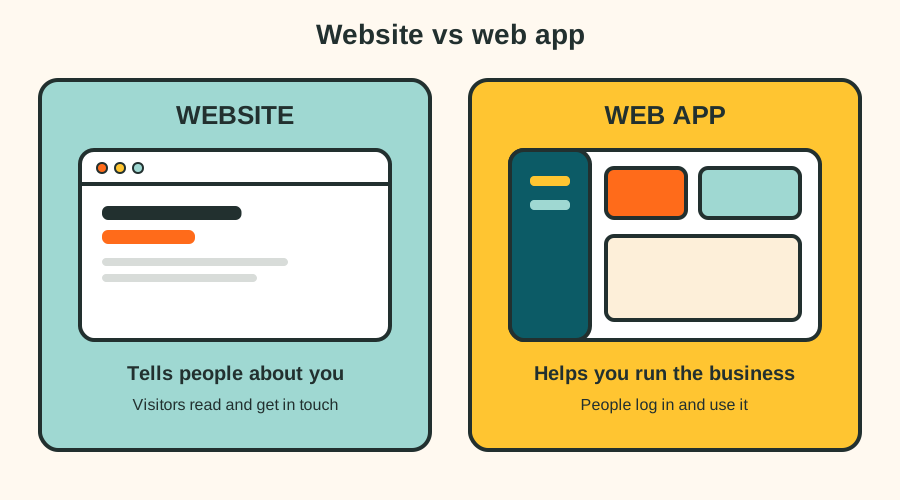
A website presents information about your business: services, prices, contact details, photos and reviews. Visitors read it and get in touch.
A web app is a tool people log in to and use. It stores information and does something with it, such as taking bookings, tracking jobs, producing quotes or showing a customer their order history. It runs in a web browser on any phone or computer, so there's nothing to install.
Signs you need a website
- Customers can't find you online, or your details are out of date.
- You want to look professional and trustworthy.
- You want enquiries through a form or phone call.
- You want to show your work, prices or menu.
See our web design service in Darwin, starting from $590.
Signs you need custom software
- You run your business from spreadsheets, shared inboxes or paper job sheets.
- Staff re-type the same information in several places.
- You miss bookings or jobs because details get lost.
- You pay for several software tools that almost fit but don't talk to each other.
- You need customers or staff to log in and see their own information.
Examples of what small businesses build
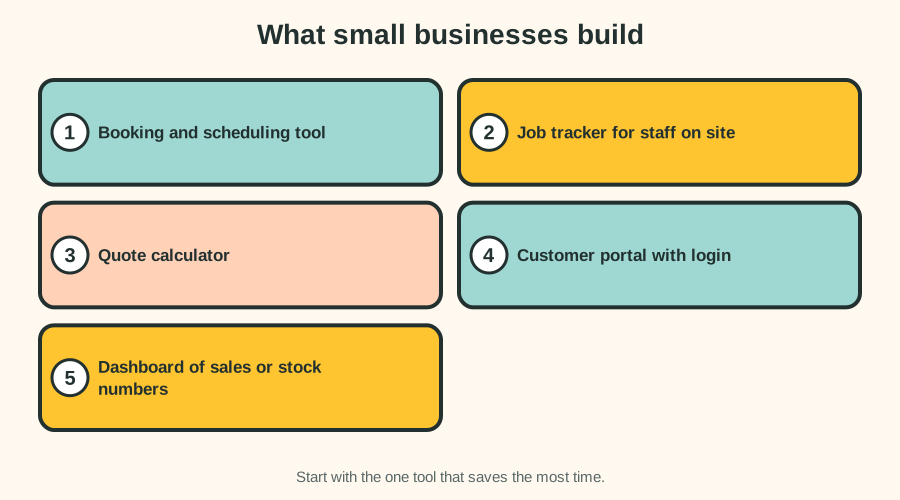
- A booking and scheduling tool for a service business, with reminders.
- A job tracker for a trades business, so staff on different sites see the same list.
- A quoting calculator that produces consistent, professional quotes.
- A customer portal where clients check progress or download documents.
- A dashboard that pulls your sales or inventory numbers into one view.
Can I use ready-made software instead?
Often, yes, and you should consider it first. Off-the-shelf tools are cheaper to start with and need no development. Custom software is worth it when ready-made tools don't fit your process, when you're paying for many subscriptions, or when your process is part of what makes your business different.
Build or buy: a quick checklist
Ready-made software is probably enough if:
- A well-known tool already does 80% or more of what you need.
- Your process is standard for your industry.
- The monthly cost is lower than a custom build over several years.
Custom software is worth considering if:
- Nothing on the market fits your process.
- You're stitching together several tools with manual work.
- You need special rules, calculations or workflows.
- You want full control over your data and how it works.
How much does custom software cost?
Prices depend on size and complexity. At CorewebIT, a simple web app starts from $2,490, excluding GST, and larger systems are quoted after a free discovery chat. We build in stages, so you can start with the one feature that saves the most time. Ongoing support starts from $99 a month. See custom software in Darwin.
What makes software cost more?
- The number of different users and roles (for example staff, managers, customers).
- The number of screens and features.
- Connections to other tools, such as accounting or email systems.
- Reports, exports and dashboards.
- Special security or privacy needs.
- Data you want to move in from an old system.
How do I start without overspending?
- List the problem, not the solution. For example, "we lose track of which jobs are done", not "we need an app".
- Pick one task to improve first.
- Build the smallest useful version. Use it for a few weeks.
- Add features based on real use.
This keeps costs down and means you're building what people actually need.
How does a software project work?
- Discovery. We talk through the problem, the users and what "done" looks like. This is free.
- Scope and quote. You get a written plan, stages and a fixed price.
- Build in stages. You see a working version early and approve each stage before we move on.
- Launch and training. We launch it and show your team how to use it.
- Support. An optional plan covers hosting, monitoring, fixes and improvements.
A simple tool typically takes 3 to 6 weeks, and larger systems take longer.
How to write a good brief
A short brief helps you get an accurate quote. Include:
- The problem: what's slow, error-prone or expensive today.
- The users: who will use the tool, and how many.
- The main tasks: the three or four things it must do.
- What you use now: spreadsheets, tools or paper.
- Anything it must connect to: accounting, email or other systems.
- Your budget range and ideal timing.
What about privacy and security?
If your software stores customer information, it should be designed with privacy in mind: only the people who need access should have it, data should be backed up, and you should know where it is stored. Good basics include:
- Secure logins, and different permissions for different roles.
- Encrypted connections (HTTPS).
- Regular backups, and a plan for restoring them.
- Keeping only the information you need.
- A privacy policy that tells people how their information is used.
We explain the options in your quote.
Mistakes to avoid
- Starting with a huge list of features.
- Building something that already exists as an affordable tool.
- Skipping training for your team.
- Forgetting ongoing costs such as hosting and support.
- Not asking who owns the software and the data.
Frequently asked questions
Do I need an app for my phone?
Usually not. A web app works in a phone's browser and can be added to the home screen. A native app in the app stores only makes sense for specific needs.
How long does custom software take?
A simple tool typically takes 3 to 6 weeks. Larger systems take longer, and we deliver in stages so you see progress early.
Who owns the software I pay for?
At CorewebIT, once the project is paid, the software and your data are yours, and we document the system.
Can I have a website and software together?
Yes. A common path is to build a website first, then add a booking or customer portal to it.
How much does custom software cost?
Simple web apps start from $2,490, excluding GST. Larger systems are quoted after a free discovery chat.
Next step
Not sure which you need? Book a free discovery chat. Contact us and describe the problem, and we'll tell you honestly whether a website, ready-made software or a custom build is the best fit.